

Introduction: Understanding Yahoo Search Submission in 2026
Want to add your website to Yahoo search? Here's what you need to know upfront: Yahoo doesn't maintain its own search index anymore. Since 2009, Yahoo's search results have been powered by Bing's technology through a partnership with Microsoft.
What does this mean for you? You don't need to submit your site separately to Yahoo. When you submit to Bing, your website automatically appears in Yahoo search results. It's a two-for-one deal that saves you time and eliminates duplicate work.
This guide walks you through the exact process to get your website indexed in both Bing and Yahoo search engines. You'll learn how to verify your site, submit your URLs, and set up automated processes that keep your content flowing into search results without manual intervention.
The best part? Modern SEO automation platforms can handle most of this work on autopilot once you complete the initial setup. We're talking about indexing that happens while you sleep, not tasks that eat up your productive hours.
Let's get your website visible where your customers are searching.
The Yahoo-Bing Partnership: What You Need to Know
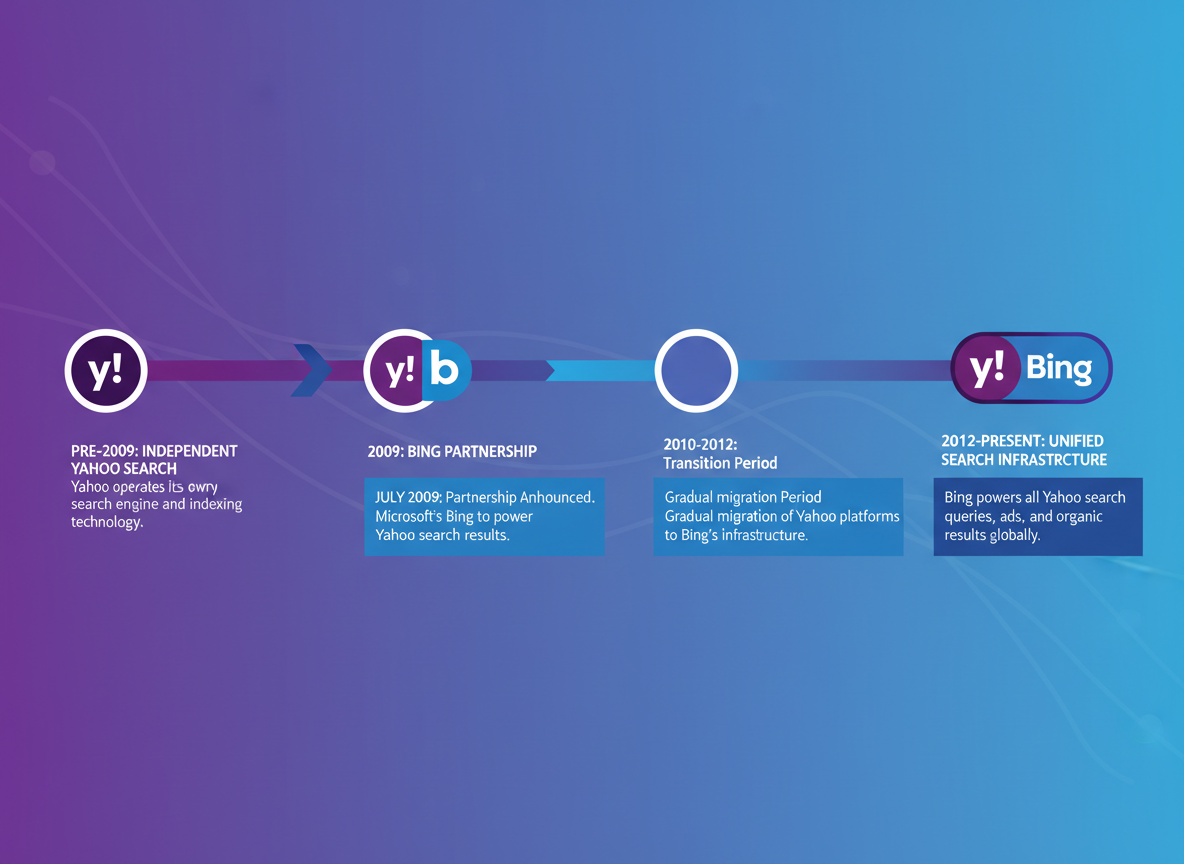
Here's something that surprises many website owners: there's no such thing as submitting your site directly to Yahoo anymore. That ship sailed back in 2009 when Yahoo and Microsoft struck a ten-year search partnership deal, handing the reins of Yahoo's search technology to Bing.
This wasn't just a minor partnership. Yahoo essentially outsourced its entire search infrastructure to Microsoft's Bing engine. When users search on Yahoo today, they're actually seeing results pulled from Bing's index—just wrapped in Yahoo's familiar purple branding.
Before 2009, Yahoo operated its own search crawler and maintained a separate submission process through Yahoo Search Submit. That service shut down years ago, along with Yahoo's Site Explorer tool that many SEOs relied on. Fast forward to 2026, and the relationship between Yahoo and Bing has evolved into a near-complete merger on the technical side.
What does this mean for you? Simple: getting your website into Yahoo Search means getting it into Bing's index first. There's no separate process, no duplicate submission forms, and no additional work required. When Bing crawls and indexes your site, those pages automatically become available in Yahoo search results.
This streamlined approach actually makes your life easier. Instead of managing submissions to multiple search engines, you can focus your energy on Bing—and Yahoo visibility comes along for the ride.
How to Submit Your Website to Yahoo Search (Via Bing Webmaster Tools)
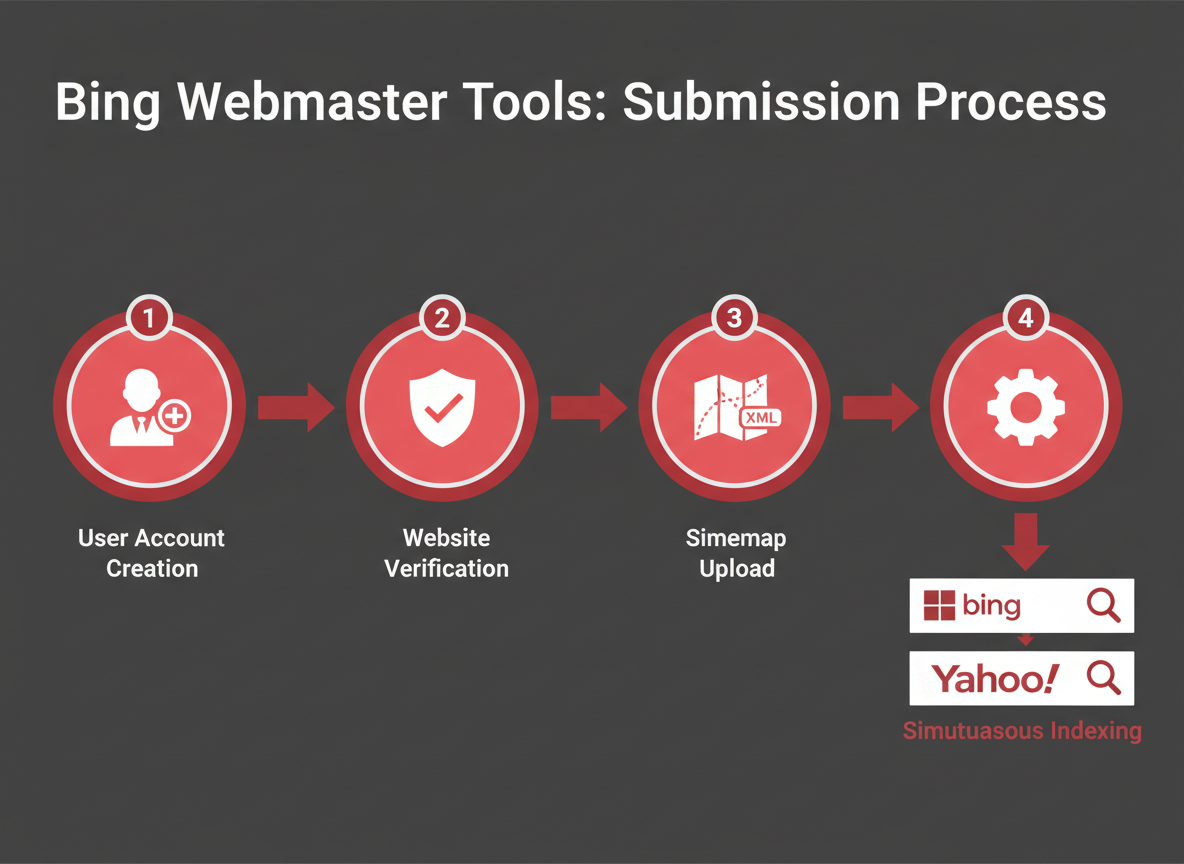
Here's the straightforward process to get your site indexed by both Bing and Yahoo simultaneously.
Step 1: Create or Sign In to Bing Webmaster Tools
Head to Bing Webmaster Tools and sign in with your Microsoft account. Don't have one? You can create a free account in under two minutes using your existing email address or phone number.
Step 2: Add and Verify Your Website
Click "Add a site" and enter your website URL. Bing offers three verification methods:
XML file upload – Download a file and upload it to your site's root directory
Meta tag – Add a verification code to your homepage's `` section
CNAME record – Add a DNS record through your hosting provider
Choose whichever method works best for your technical comfort level. The meta tag option typically takes about 30 seconds if you have easy access to your site's code.
Step 3: Submit Your XML Sitemap
Once verified, navigate to "Sitemaps" in the left sidebar. Enter your sitemap URL (usually `yourdomain.com/sitemap.xml`) and click Submit. This tells Bing exactly which pages you want indexed and helps speed up the crawling process.
If you're using a platform like Vulcaro, your sitemap gets generated automatically as you publish content—no technical setup required. You can explore more automation features that handle these technical details while you focus on growing your business.
Step 4: Configure Site Settings
Under "Configure My Site," set your preferred geographic target and site language. These settings help both search engines understand your audience.
The Yahoo Connection
Here's the best part: once you've completed these steps in Bing Webmaster Tools, your site automatically appears in Yahoo search results. You don't need to do anything extra since Yahoo's organic search is powered by Bing.
Expected Timeline
Most sites see their first pages indexed within 48-72 hours. Full site indexing typically happens within 1-2 weeks, though this varies based on your site's size and content quality.
Creating and Optimizing Your XML Sitemap for Yahoo/Bing
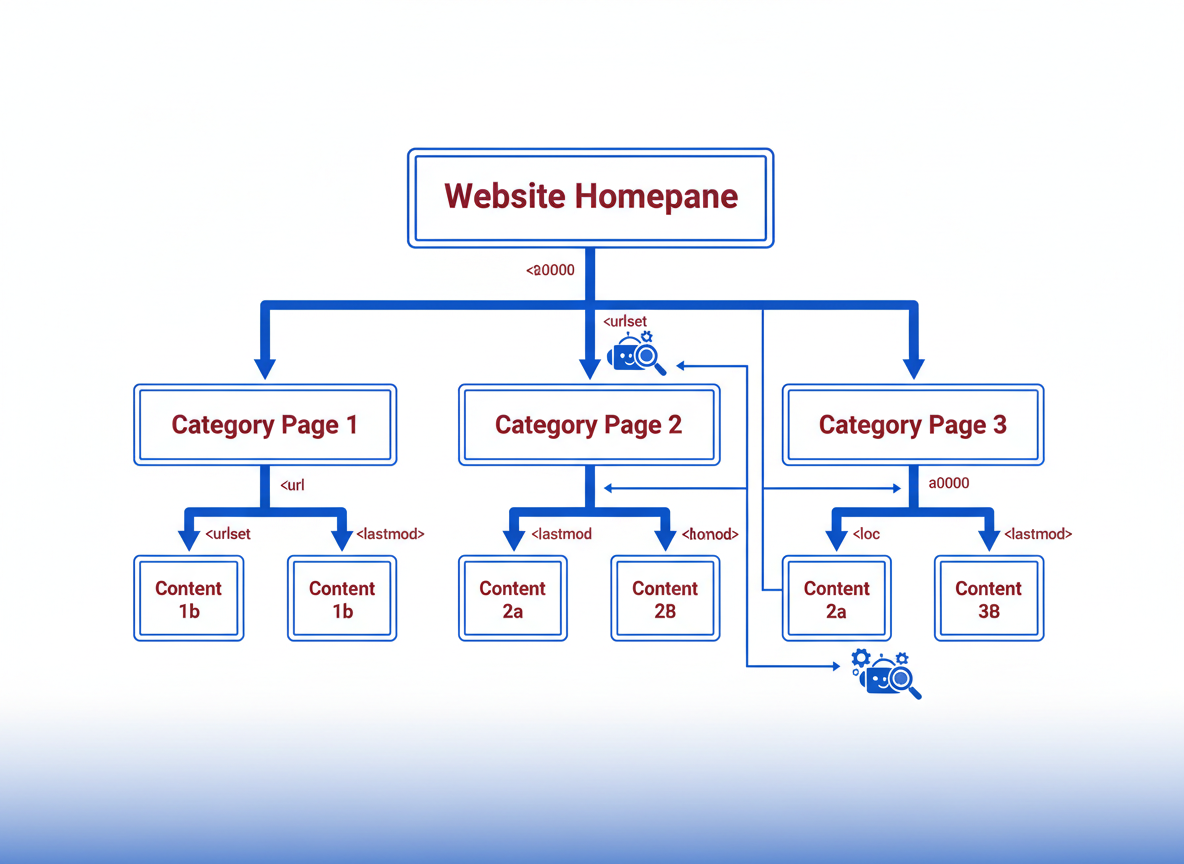
Your XML sitemap works like a roadmap for search engines—it tells Yahoo (through Bing) exactly which pages on your site deserve attention. Without one, you're making crawlers guess their way around, which never ends well.
Think of it this way: your sitemap lists every important URL on your site in a structured format that search engines can digest instantly. It's not optional if you want consistent indexing.
Generating Your Sitemap
WordPress users have it easy. Install Yoast SEO or RankMath, and they'll automatically generate and update your sitemap. You'll find it at yoursite.com/sitemap.xml. For other platforms, try Screaming Frog SEO Spider or XML-Sitemaps.com—both create comprehensive sitemaps in minutes.
Best Practices That Actually Matter
Keep your sitemap under 50,000 URLs and 50MB. If you've got more pages than that, split into multiple sitemaps using a sitemap index file. Update frequency matters too—set your sitemap to refresh whenever you publish new content. Most tools handle this automatically, especially when you've got proper integrations running behind the scenes.
Placement and Submission
Upload your sitemap to your root directory (that /sitemap.xml location we mentioned). Then head to Bing Webmaster Tools, navigate to Sitemaps under the Crawl section, and paste in your sitemap URL. Hit submit, and you're done.
Common Sitemap Errors
Watch for 404 errors in submitted URLs—these kill your credibility with search engines. Also check for redirect chains (pages that bounce users through multiple URLs) and accidentally blocked pages in your robots.txt file. Bing Webmaster Tools flags these issues directly in the sitemap report, making fixes straightforward.
Verifying Your Website Ownership in Bing Webmaster Tools
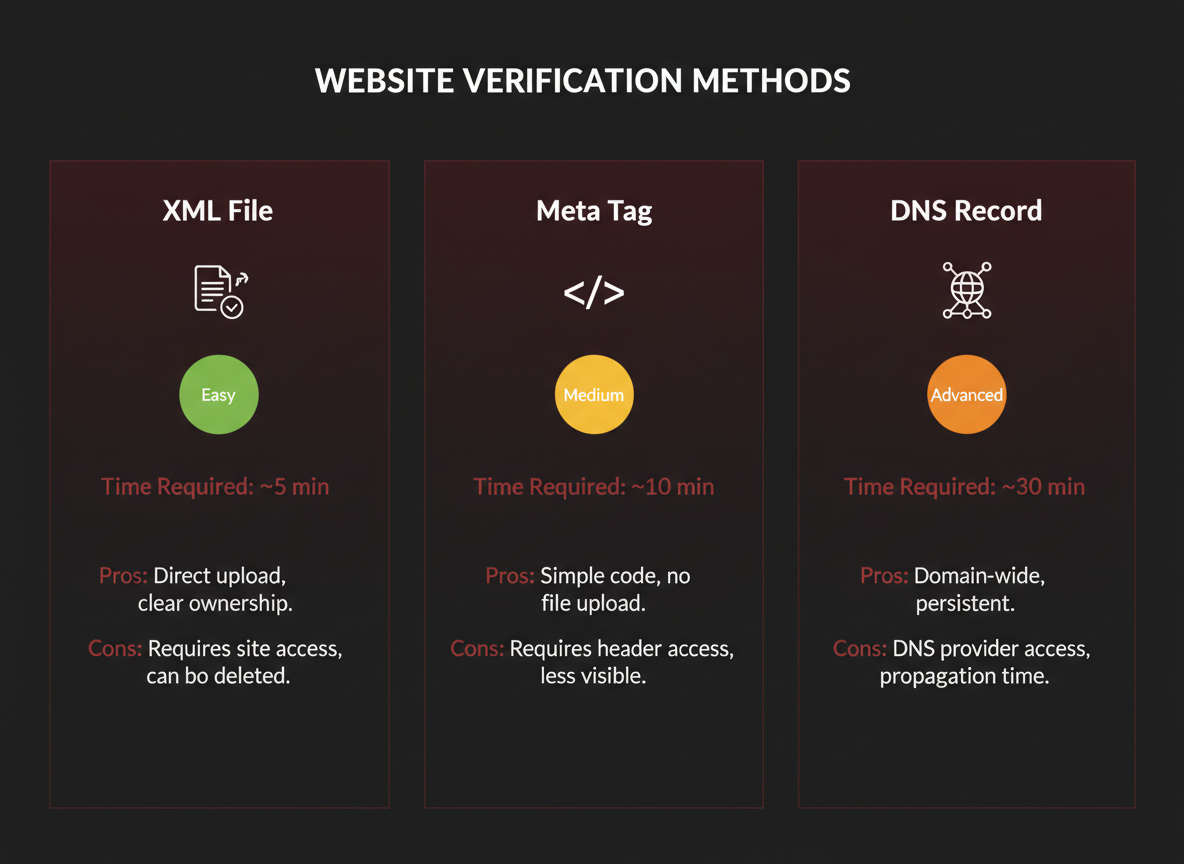
Before Yahoo accepts your website submission, you'll need to verify ownership through Bing Webmaster Tools. This security step proves you're actually the site owner, not someone trying to manipulate another website's search presence.
Method 1: XML File Verification (Easiest)
Download the XML verification file from Bing Webmaster Tools, then upload it to your website's root directory. Most FTP clients or hosting control panels make this straightforward. Once uploaded, hit "Verify" in Webmaster Tools. This typically takes 30 seconds.
Method 2: Meta Tag Verification
If you're using WordPress or another CMS, this method's probably your best bet. Copy the meta tag from Webmaster Tools and paste it into your site's header section. Many themes let you add custom header code without touching files directly. Check out our documentation for CMS-specific instructions.
Method 3: DNS CNAME Record
For tech-savvy users or those managing multiple domains, adding a CNAME record through your domain registrar works well. Copy the CNAME details from Webmaster Tools and add them to your DNS settings. Note: DNS changes can take up to 24 hours to propagate.
Choosing Your Method
XML file verification wins for speed. Meta tag verification's perfect if you never touch server files. DNS verification's ideal when managing multiple properties or subdomains.
Common Issues
File verification failing? Check that you uploaded to the root directory, not a subfolder. Meta tag not working? Clear your site cache first. DNS verification pending? Give it time—propagation isn't instant.
Checking Your Yahoo Search Indexing Status
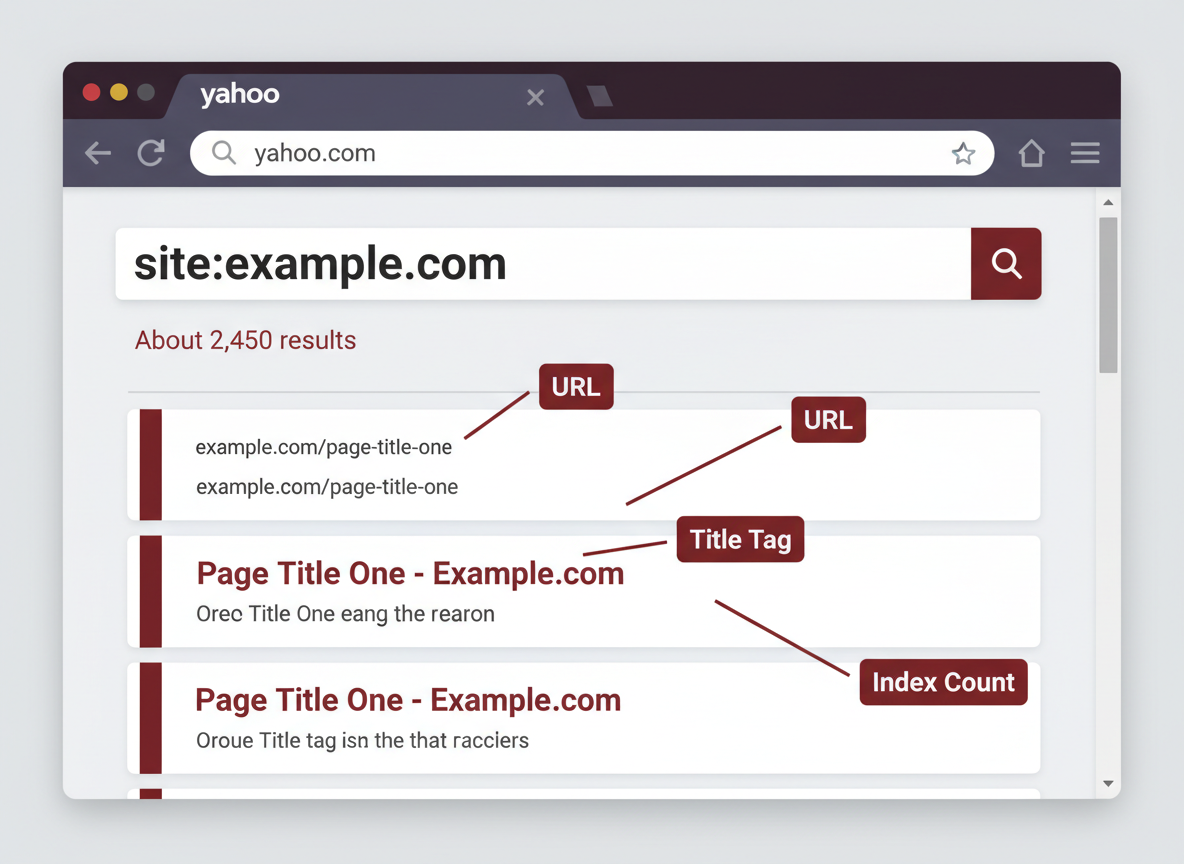
Once you've submitted your site, you'll want to confirm Yahoo's actually picking it up. The quickest way? Use the `site:` operator in Yahoo's search bar. Just type `site:yourdomain.com` and hit enter. If your pages appear in the results, you're indexed. If nothing shows up, don't panic—it doesn't mean you've done something wrong.
Since Yahoo pulls from Bing's index, head over to Bing Webmaster Tools to monitor what's happening behind the scenes. The Index Explorer shows exactly which pages Bing (and therefore Yahoo) has crawled and indexed. You'll see your indexed page count, crawl dates, and any issues that might be blocking indexation.
The URL Inspection tool is particularly useful when you're checking specific pages. Enter any URL from your site, and you'll get a detailed report showing whether it's indexed, when it was last crawled, and if there are any problems preventing it from appearing in search results.
Timeframes vary considerably. Some sites get indexed within hours, while others take weeks. Newer domains typically wait longer than established ones.
If your pages aren't showing up after a few weeks, check for common culprits: robots.txt files blocking crawlers, noindex tags in your page headers, or redirect chains. You can also request manual indexing through Bing Webmaster Tools for priority pages. If you're still stuck, reach out through Vulcaro's help resources for expert guidance.
Troubleshooting Yahoo Search Visibility Issues
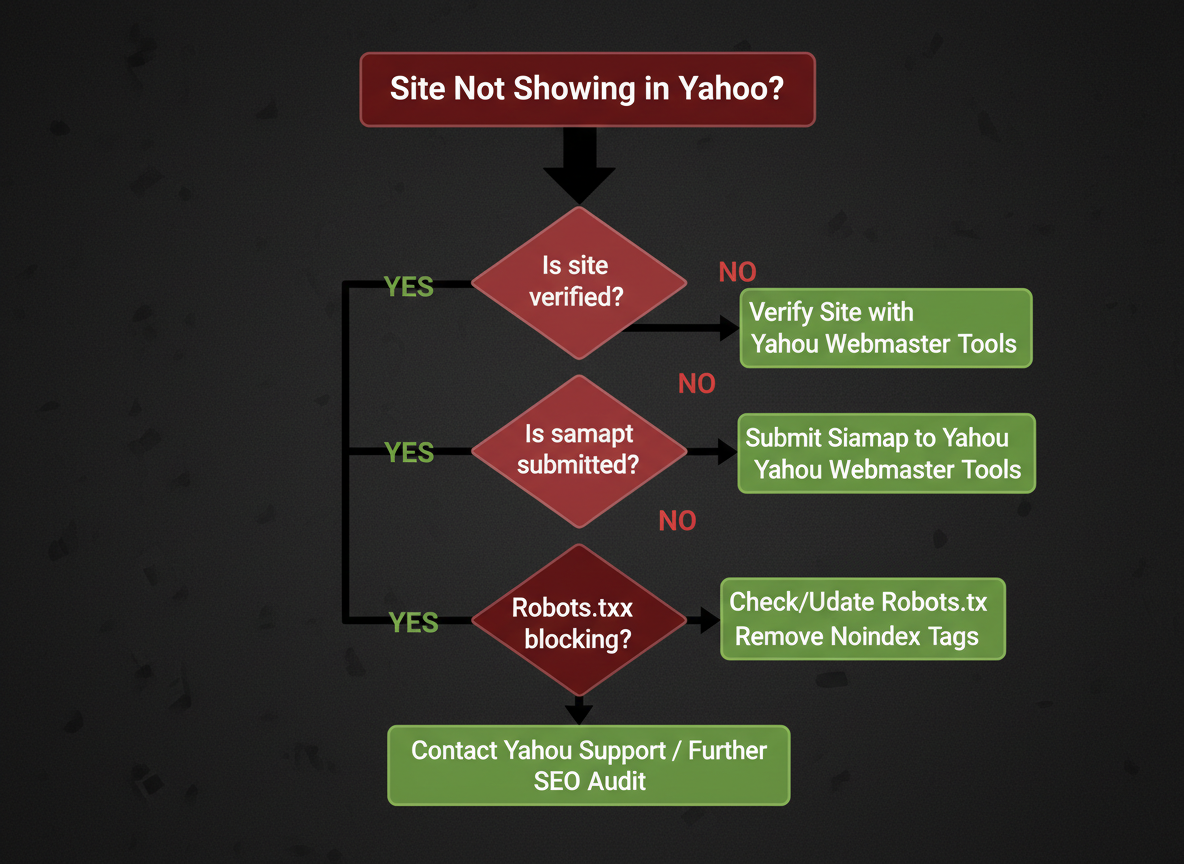
Sometimes you've done everything right, but your site still isn't showing up in Yahoo search results. Let's fix that.
The most common culprit? Your robots.txt file is blocking the Bingbot crawler. Since Yahoo uses Bing's search technology, you'll need to check that your robots.txt doesn't have any rules preventing access. Log into Bing Webmaster Tools and navigate to the URL Inspection tool—it'll tell you exactly what's being blocked.
Another frequent issue is the noindex meta tag sitting quietly in your page headers. Many site owners accidentally leave these tags from development or staging environments. Search your page source for `` and remove it if you find it lurking there.
Crawl errors in Bing Webmaster Tools deserve immediate attention. These typically include 404 errors, server timeouts, or redirect chains. Yahoo can't index pages it can't properly access, so tackle these systematically. Start with pages that have the most backlinks or generate the most organic traffic.
Duplicate content penalties are real. If you've copied content across multiple pages or scraped from other sites, that's likely why you're not appearing. Create original, valuable content that serves your audience's needs.
If your pages are indexed but not ranking, you're dealing with a quality or relevance issue rather than a technical one. Review your content against what's currently ranking for your target keywords. Sometimes, implementing an SEO automation platform can help you identify gaps and optimize at scale without drowning in manual work.
When you've made significant fixes, use the URL Inspection tool in Bing Webmaster Tools to request re-indexing. Changes typically reflect within 48-72 hours.
Yahoo vs. Other Search Engines: Traffic Potential in 2026
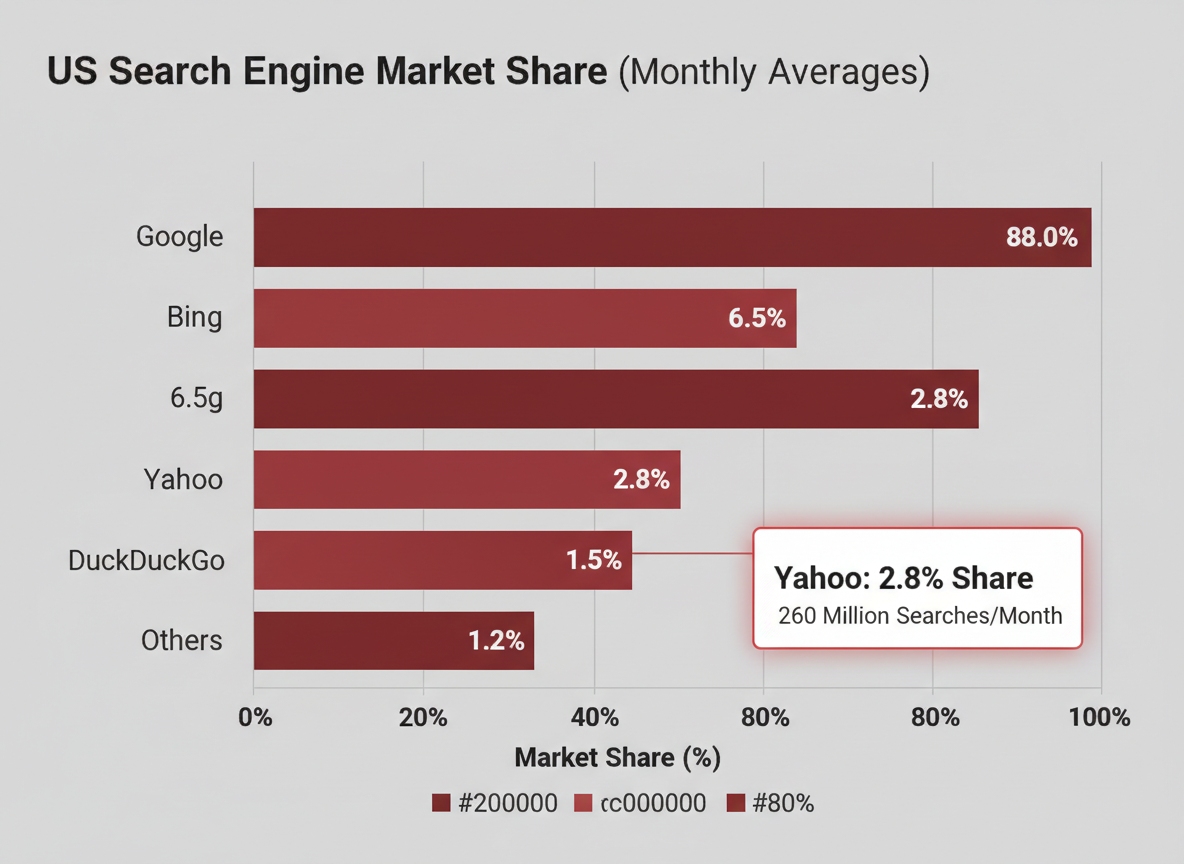
Yahoo Search holds roughly 2.3% of the U.S. search market as of 2026, which sounds small compared to Google's dominance. But here's what that actually means for your business: millions of daily searches from a specific demographic you might be missing entirely.
Yahoo's user base skews older, typically 45-65+, with higher household incomes. These users aren't tech-native millennials who've abandoned Yahoo—they're established professionals, retirees, and decision-makers with purchasing power. They search differently too, using more complete sentences and question-based queries rather than short keywords.
Here's the real opportunity: Yahoo's search results come from Bing's index. When you optimize for one, you're essentially capturing both. That combined reach jumps to roughly 6-7% of U.S. searches, translating to potentially hundreds or thousands of qualified visitors monthly, depending on your niche.
Certain industries see disproportionate Yahoo traffic. Healthcare, finance, insurance, and home services consistently perform better because Yahoo's demographic aligns perfectly with these high-value sectors. If you're targeting decision-makers with actual budgets, ignoring Yahoo leaves money on the table.
Think about it this way: if Google sends you 10,000 visitors monthly, Yahoo and Bing combined might deliver 600-700. That's not negligible—especially when the competition for those visitors is significantly lower. You'll rank higher, faster, with less effort. For strategies on maximizing your overall search visibility, check out our blog for comprehensive SEO insights.
The submission process takes minutes. The potential return? Worth far more than the time invested.
Regional Yahoo Search Variations: Yahoo Japan and International Considerations
Here's something that trips up many business owners: Yahoo Japan isn't just a translated version of Yahoo. It operates as a completely independent entity with its own search technology.
Unlike Yahoo in the US, which relies on Bing's search infrastructure, Yahoo Japan developed its own search engine. This means your submission to Yahoo in the US won't automatically appear on Yahoo Japan. You'll need to submit directly through Yahoo Japan's webmaster tools if you're targeting Japanese audiences.
The submission process involves navigating their Japanese-language interface at site.search.yahoo.co.jp. You'll need to create a separate account and verify your website ownership through their system. Google Translate can help, but you'll get better results with localized content that respects Japanese web conventions and user preferences.
Other regions typically use the same Bing-powered infrastructure as US Yahoo. Australia, UK, and Canada follow the standard Yahoo search model, so once you're indexed in Bing, you're generally covered.
When does regional Yahoo targeting actually matter? If you're selling products or services in Japan, where Yahoo commands significant market share, it's worth the effort. For most businesses focused on North American or European markets, optimizing for Bing (and therefore Yahoo) through standard methods works fine.
Language localization goes beyond translation. Your website needs proper hreflang tags, region-specific content, and culturally appropriate messaging. The team at Vulcaro understands these nuances when helping businesses expand their international search presence.
Yahoo Search Marketing and Paid Alternatives
While organic submission gets your website into Yahoo's index, paid advertising can deliver immediate visibility before your SEO efforts gain traction. Yahoo's search ads run through the Microsoft Advertising platform, which means you'll manage campaigns through Microsoft's interface while your ads appear across Yahoo's search results.
Microsoft Ads work similarly to other PPC platforms—you bid on keywords, create ad copy, and pay per click. Your ads appear at the top of Yahoo search results with an "Ad" label, giving you prime real estate above organic listings. It's instant visibility, but it comes at a cost.
The organic vs. paid debate really comes down to timeline and budget. Organic submission costs nothing and builds long-term value, but takes weeks or months to show results. Paid ads deliver traffic on day one but stop the moment you stop paying.
Yahoo also offers native advertising options through its content network, letting you promote articles and content alongside Yahoo's editorial feeds.
Budget considerations matter. Most businesses see better ROI combining both approaches—using paid ads for immediate wins while building organic presence for sustainable growth. If you're optimizing your overall marketing spend, check out Vulcaro's pricing options to automate your SEO work while you focus on conversion-driven paid campaigns.
Optimizing Content for Yahoo Search Rankings
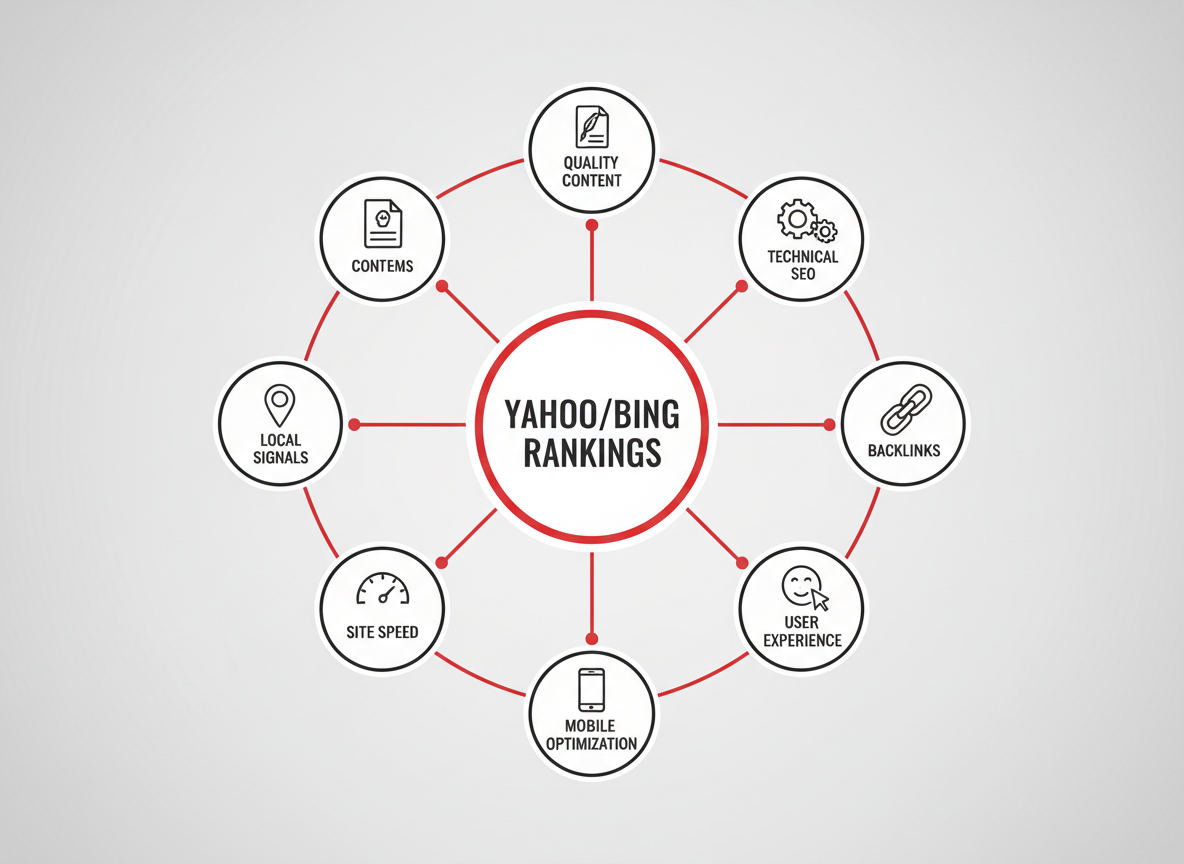
Since Yahoo's search results come from Bing, you'll want to focus on the ranking factors that matter most to Bing's algorithm. The good news? Many of these align with standard SEO best practices you're probably already following.
Content Quality Signals
Bing (and by extension, Yahoo) places heavy emphasis on content depth and expertise. You'll see better rankings when your content demonstrates clear authority, includes relevant multimedia, and provides genuine value. Think comprehensive answers rather than thin, keyword-stuffed pages.
Technical Foundation
Your site's technical health plays a significant role. Bing strongly favors HTTPS-secured sites, so if you're still running HTTP, that's your first priority. Site speed matters too—pages that load in under three seconds consistently outperform slower competitors. Mobile-friendliness isn't optional anymore; it's expected.
On-Page Optimization Elements
Focus on these specific elements: descriptive title tags (50-60 characters), compelling meta descriptions, proper heading structure (H1, H2, H3), and strategic keyword placement in your first 100 words. Bing's algorithm appreciates semantic relevance, so use natural variations of your terms.
Backlink Profile
Quality beats quantity here. Yahoo/Bing values authoritative backlinks from reputable sites within your industry. A few high-quality links outperform dozens of low-value directory submissions.
Local SEO for Yahoo
If you serve local customers, claim and optimize your Bing Places listing (which powers Yahoo Local). Consistent NAP (Name, Address, Phone) information across the web helps tremendously.
Managing all these optimization factors manually takes serious time. That's where an SEO Automation Platform becomes invaluable—handling technical audits, content optimization, and ranking monitoring while you focus on running your business.
Monitoring Your Yahoo Search Performance
Once your site's indexed, you'll want to track how it's performing. Since Yahoo's search results come from Bing, your primary tracking hub is Bing Webmaster Tools. This free platform shows exactly how your pages are doing in Yahoo search results.
Head to the Search Performance report in your Bing Webmaster dashboard. Here's what you'll see: impressions (how often your site appears in search results), clicks (actual visits from search), click-through rate (CTR), and your average position. These metrics tell the real story of your visibility. If you're getting lots of impressions but few clicks, your titles and descriptions need work. Low impressions? You need to target different keywords or create more content.
Set up Google Analytics to specifically track Yahoo referral traffic. Create a custom segment that filters for Yahoo as the traffic source. You'll see which pages attract Yahoo searchers and how they behave once they land on your site. This data's gold for refining your strategy.
Third-party tools like SEMrush, Ahrefs, or Moz also track search engine performance, though they typically combine Yahoo data with Bing. For businesses managing multiple websites, platforms like Vulcaro with their automated performance tracking features can simplify monitoring across all your properties.
Document your starting metrics and check them monthly. Real progress happens when you're measuring consistently and adjusting based on what the data tells you.
Automating Your Yahoo Search Submission and SEO Workflow

Let's be honest—manually submitting sitemaps, monitoring indexing status, and keeping up with SEO updates eats into time you should spend growing your business. If you're checking Yahoo and Bing indexing every week, you're already doing too much.
Automated SEO platforms transform how you maintain search engine visibility. Instead of logging into multiple webmaster tools, you can set up workflows that handle the technical heavy lifting. This means automatic sitemap generation whenever you publish new content, instant submission to Yahoo through Bing's infrastructure, and continuous monitoring without your involvement.
Here's what makes automation worthwhile: a business owner spending 5 hours monthly on manual SEO tasks is losing $500-1,000 in opportunity cost (based on average hourly value). Multiply that over a year, and you're looking at serious money that could fuel actual growth initiatives.
Vulcaro handles this entire workflow automatically. The platform generates optimized sitemaps, submits them to search engines on your behalf, and creates content specifically tuned for Yahoo/Bing's ranking algorithms. You're not babysitting the process—you're running your business while the system works in the background.
Setting up autopilot SEO means your website stays visible and fresh in search engines while you sleep. New blog posts? Automatically indexed. Product pages? Submitted and tracked. Technical SEO updates? Applied without your intervention.
The ROI is straightforward: you reclaim dozens of hours annually while maintaining (or improving) your search presence. That's time you can redirect toward customer acquisition, product development, or actually stepping away from your desk.
Additional Search Engines to Consider Beyond Yahoo
While you've taken the smart step to add your website to Yahoo search engine, don't stop there. Your search visibility strategy should cast a wider net.
Google Search Console deserves your attention first—it's non-negotiable for most businesses. The submission process is straightforward and gives you direct access to the world's largest search audience.
Bing-powered engines work differently than you might expect. When you submit to Bing Webmaster Tools, you're automatically covered for Yahoo, DuckDuckGo, and Ecosia. That's one submission reaching multiple platforms—exactly the kind of efficiency that gets results.
Some engines require separate submission. Brave Search maintains its own independent index, as do Yandex (essential for Russian markets) and Baidu (necessary for China).
Consider niche search engines based on your industry. Medical sites benefit from health-specific directories, while local businesses should prioritize regional search platforms.
Your target audience determines where you'll invest your time. E-commerce sites? Focus on shopping-specific engines. B2B services? LinkedIn's search ecosystem matters more than consumer platforms.
Want to track which search engines drive the most qualified traffic? The Vulcaro blog regularly covers analytics strategies that show you exactly where your SEO efforts pay off.
Frequently Asked Questions
Can I still submit my website directly to Yahoo search?
No, Yahoo doesn't accept direct website submissions anymore. Since their 2009 partnership with Bing, Yahoo's search results come from Microsoft's Bing search engine. You'll submit through Bing Webmaster Tools instead, which automatically covers both search engines.
How long does it take for Yahoo to index my website?
Expect anywhere from a few days to several weeks. Most websites appear within 1-2 weeks after Bing indexing, though the timeline varies based on your site's authority, content quality, and how well you've optimized your technical SEO.
Is Yahoo search submission free?
Yes, completely free. Submitting your URL through Bing Webmaster Tools costs nothing, and there's no paid fast-track option for organic search indexing.
Do I need separate submissions for Bing and Yahoo?
Not at all. One submission to Bing Webmaster Tools handles both search engines automatically. You'll manage everything from a single dashboard.
Why can't I find my website on Yahoo but it's on Google?
Yahoo (via Bing) uses different ranking algorithms than Google. Check that you've actually submitted to Bing Webmaster Tools, verify your robots.txt isn't blocking Bingbot, and confirm your content meets Bing's quality standards.
Does Yahoo have its own webmaster tools?
No longer. Yahoo used to have Yahoo Site Explorer years ago, but that's long gone. Everyone uses Bing Webmaster Tools now for Yahoo search management.
Will submitting to Bing guarantee Yahoo rankings?
Submission gets you indexed, but it doesn't guarantee rankings. You'll still need quality content, proper optimization, and solid backlinks to rank well.
How is Yahoo Japan different from Yahoo US for search submission?
Yahoo Japan operates independently and doesn't use Bing's index. It has its own submission process and requirements if you're targeting Japanese audiences.
Can automated SEO tools help with Yahoo visibility?
Absolutely. Tools like Vulcaro automate technical optimizations, content improvements, and monitoring—all while you focus on your business. Check our Help center for specific guidance.
What's the difference between Yahoo organic and paid search?
Organic results come from indexing and SEO (free). Paid search ads appear at the top through Yahoo's advertising platform (which also runs through Microsoft Advertising).